
Turning your documents into artifacts, on-device: NativeLM Studio
NativeLM v0.6.0 adds Studio — generate briefings, FAQs, study guides, timelines, mind maps, and even spoken audio overviews from your own documents, entirely on the phone, via a map-reduce pipeline over on-device Gemma.
NativeLM could already chat with your documents, fully on-device — grounded answers with citations (v0.4 RAG), OCR for scans and photos, and hybrid retrieval so exact terms actually get found (v0.5). That’s the ask a question side. v0.6.0 adds the other side: Studio turns a document into a structured artifact you can keep — a briefing, a study guide, a timeline, even a spoken audio overview — without anything ever leaving the phone.
The people NativeLM is built for — anyone whose documents are too sensitive to upload — don’t only want to query a contract or a case file. They want a summary they can skim, a set of key topics, a timeline of events. Cloud tools do this happily, by uploading your document first. Studio does it the only way consistent with the product’s promise: locally, with no account, no upload, and no network call except the one-time model download.
Eight artifacts from one document
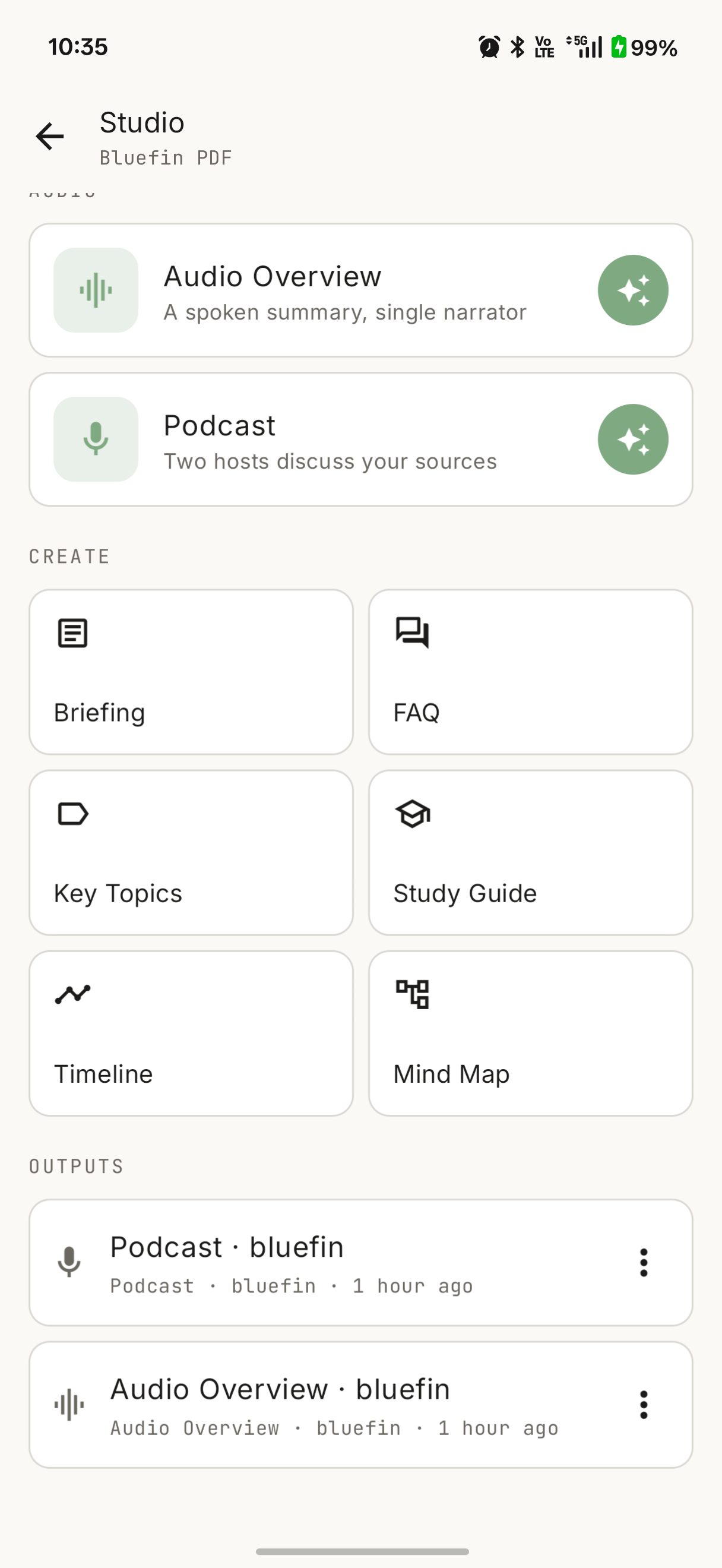
Studio generates eight artifact types from a whole project or a single document:
- Briefing — an executive summary.
- FAQ — the questions a reader would actually ask, answered.
- Key Topics — the main themes, each with a hook to ask about it in chat.
- Study Guide — key terms and review questions.
- Timeline — events in order.
- Mind Map — the structure as a navigable, zoomable map.
- Audio Overview — a single-narrator spoken script, played through the phone’s text-to-speech.
- Podcast — a two-host (Alex and Sam) spoken dialogue, also via on-device TTS, with two distinct voices.
The six text artifacts render as markdown. The two audio ones are the interesting case, and I’ll come back to them.
The real problem: a small context window
The reason this is an engineering post and not a prompt-template post is the context window. An on-device model runs in a few gigabytes of RAM; its context is a fraction of what a hosted frontier model gets. You cannot stuff a forty-page report into a single prompt and ask for a summary — it won’t fit, and even when it nearly fits, quality degrades badly at the edges.
So Studio uses map-reduce, the same shape you’d use to summarize a corpus too large to hold in memory:
- Map — split the document into windows that comfortably fit the context, and run a MAP prompt over each one to extract a compact partial digest.
- Reduce — concatenate the partial digests (now small enough to fit together) and run a final prompt that synthesizes them into the target artifact.
document ──split──► [w1, w2, … wN]
                      │   │      │
                  MAP │   │ MAP  │ MAP        (one pass per window)
                      ▼   ▼      ▼
                    [d1, d2, … dN]  ──concat──► digest
                                                   │
                                          REDUCE / final prompt
                                                   ▼
                                   Briefing │ FAQ │ Timeline │ Audio …
The map pass is where the cost lives — a long document is many windows, each its own inference pass — but it’s also what makes the whole thing possible on-device at all. The reduce stage stays cheap because it only ever sees the digest, never the raw document.
The clean part of this design is that every artifact type is just a different final prompt over the same shared digest. Map once, reduce many ways. Adding a new artifact type is writing one prompt, not building a new pipeline. All of it runs over the same on-device engine NativeLM already ships: litertlm-kmp, a Kotlin Multiplatform wrapper around Google’s LiteRT-LM, driving Gemma.
Making the audio sound like audio
The Audio Overview and Podcast types reduce into a spoken script rather than a document, then play it locally with Android’s built-in TextToSpeech. There’s no cloud voice API — the same rule as everything else.
Two details matter for the script to not sound robotic. First, the final prompt is told to write flowing prose with no markdown and numbers spelled out (“forty-seven million” rather than “47,000,000”), because a TTS engine reads punctuation and digits literally. Second, the Podcast script is parsed into speaker turns and played one at a time, with a different on-device voice per speaker plus a per-speaker pitch offset — a guaranteed differentiator even on devices that only ship one usable voice. Each turn queues the next from its own completion callback, so the dialogue advances cleanly and pause/resume works mid-conversation.
The UI
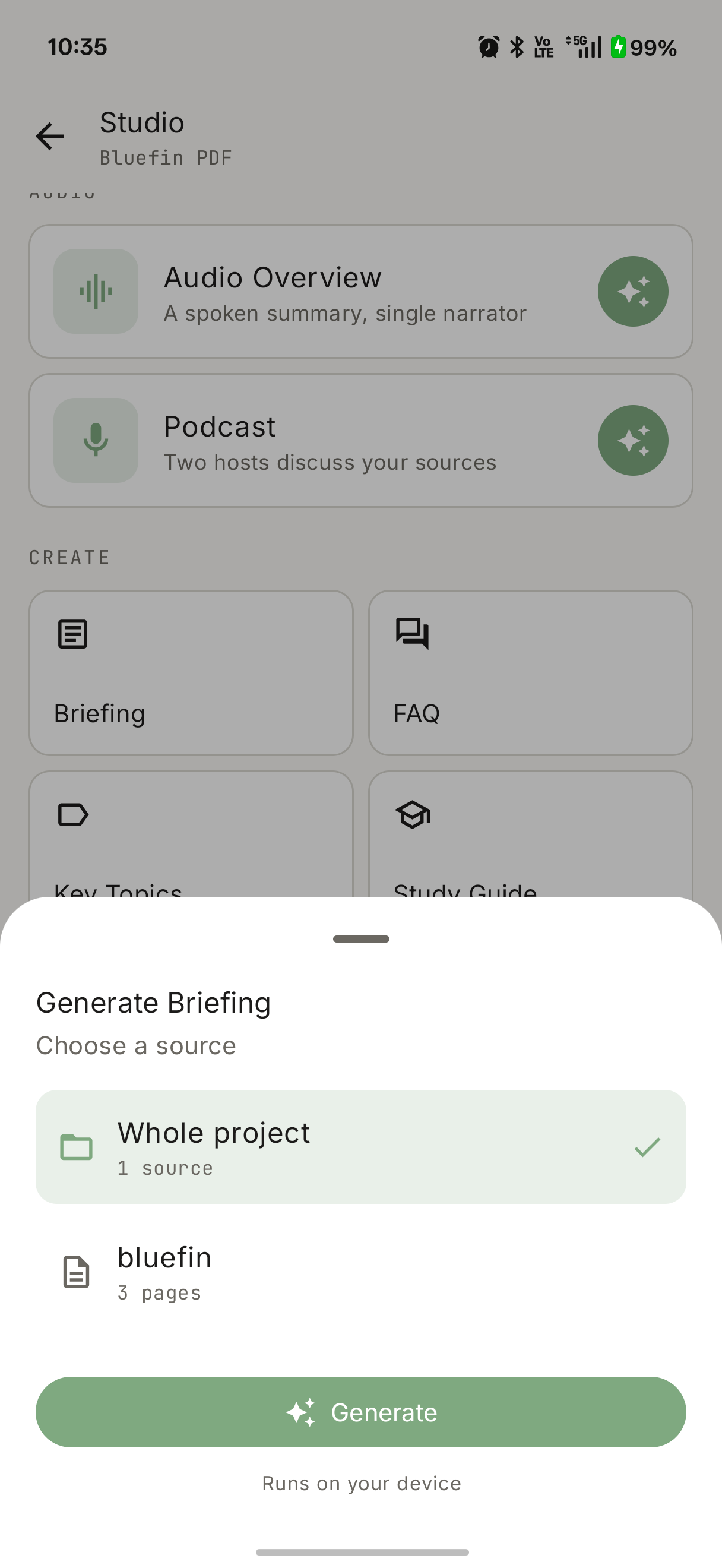
The generate panel leads with the two audio types as hero cards, then a grid of the six text types, then your existing outputs. Picking a source is a bottom sheet — generate from the whole project, or scope it to a single document — captioned “Runs on your device” so the guarantee is visible at the point of action. It all sits in NativeLM’s sage-green / off-white aesthetic; no sparkle, no cloud round-trips.
Try it out
NativeLM Studio is live in v0.6.0 — open source, AGPL-3.0, no telemetry, no account, no upload. The engine underneath is dual-licensed (AGPL-3.0 / commercial).
- Source: the litertlm-kmp repository.
- Grab the v0.6.0 release and turn one of your own documents into a briefing on your own device.
Read next
Built on-device, in the open
NativeLM is a private, local-AI chat app powered by litertlm-kmp. No cloud, no accounts, zero telemetry.
Comments